RK S98 Switch Compatibility & Customization Guide
RK ROYAL KLUDGE S98 Compatibility & Customization Guide
The RK ROYAL KLUDGE S98 hot-swappable switches feature makes it easier to personalize your mechanical keyboard without soldering. Whether you prefer smooth linear keystrokes, noticeable tactile feedback, or quieter typing, changing compatible switches can help you adjust your keyboard to your daily needs.
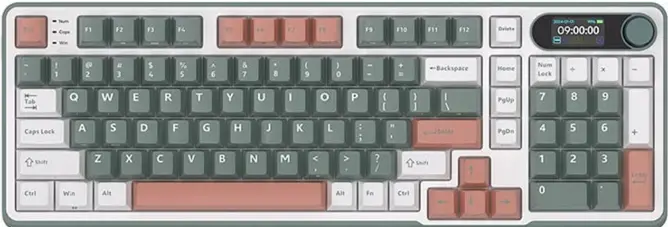
The Royal Kludge S98 is a 96% mechanical keyboard with a hot-swappable PCB, RGB backlighting, and multiple connectivity options. Its switch-replacement design allows users to experiment with different mechanical switches while keeping the same keyboard. However, choosing suitable replacements requires attention to switch compatibility, pin configuration, feel, sound, and intended use.
This guide explains how hot-swappable switches work on the RK S98, which switch types to consider, how to replace a switch safely, and what to check before buying replacement switches.
What Does Hot-Swappable Mean on the RK S98?
A hot-swappable keyboard allows compatible mechanical switches to be removed from their sockets and replaced without soldering. The Royal Kludge S98 uses this design to give users more control over their typing experience.
On a conventional soldered mechanical keyboard, replacing a switch generally requires desoldering the old switch and soldering a replacement. With the RK S98, compatible switches can instead be removed using a switch puller and inserted into the existing sockets.
This provides several benefits:
- Personalized typing feel: Choose switches that better match your preferences.
- Easier switch replacement: Replace a faulty compatible switch without soldering.
- Sound customization: Experiment with switches that produce different acoustic characteristics.
- Gradual upgrades: Test different switches over time instead of replacing the entire keyboard.
- Flexible use: Select switches suited to office work, everyday typing, or gaming.
Hot-swappable does not mean that every mechanical switch will fit. Compatibility depends on the socket, switch pins, physical design, and other specifications.
Which Switches Are Compatible with the RK Royal Kludge S98?
The most important consideration when buying replacement switches is compatibility with the S98’s hot-swappable PCB.
Mechanical switches can differ in their pin arrangement, housing dimensions, mounting structure, and electrical characteristics. A switch that fits one keyboard may not work correctly in another.
Before ordering replacements, check the following factors.
1. Switch pin configuration
Many mechanical switches use either a three-pin or five-pin arrangement. Three-pin switches typically have two metal electrical contacts and one central plastic positioning pin. Five-pin switches add two plastic positioning pins.
Do not assume that every three-pin or five-pin switch is automatically compatible with the RK S98. Confirm the socket type and mounting requirements for your exact keyboard version. If a replacement switch has extra plastic positioning pins that are incompatible with the socket, check whether the manufacturer permits trimming them before attempting any modification.
Never force a switch into its socket.
2. MX-style mechanical switch design
The S98 is designed for compatible mechanical switches, including supported RK switch options. MX-style switches are common in the mechanical keyboard market, but the general MX-style designation alone does not guarantee compatibility.
Check the manufacturer’s compatibility information and compare the replacement switch with the original switch removed from your keyboard.
3. Switch dimensions and stem
The replacement must fit the keyboard’s socket and support the intended keycap mounting style. Most conventional mechanical keycaps use a cross-shaped stem, but alternative designs exist.
If you plan to keep your existing keycaps, confirm that the replacement switches use a compatible stem.
4. Electrical and socket compatibility
Even if a switch appears to fit physically, its electrical contacts must align correctly with the hot-swap socket.
Check that the switch is intended for compatible mechanical keyboard sockets. Inspect its pins for bending before installation, and do not press down forcefully if the switch does not seat correctly.
Important: The safest approach is to verify compatibility with the exact S98 edition and its manufacturer documentation before purchasing a large set of replacement switches.
Types of Mechanical Switches for the RK S98
Different switches can change how a keyboard feels and sounds. The three main categories are linear, tactile, and clicky switches.
Linear switches
Linear switches move smoothly from the beginning of a keypress to the actuation point without a distinct tactile bump.
They may appeal to users who prefer consistent keystrokes, smooth movement, and a straightforward feel when gaming or typing.
Consider linear switches if you:
- Prefer smooth key movement.
- Play games that involve repeated keypresses.
- Want a consistent feel across frequently used keys.
- Prefer to choose sound characteristics through switch and keycap combinations.
Linear switches are not automatically faster or better for gaming. Performance also depends on actuation characteristics, practice, and personal preference.
Tactile switches
Tactile switches provide a noticeable bump during a keypress. This feedback can help users recognize when a key is actuated.
They are often considered by people who spend considerable time writing, studying, or working with documents.
Tactile switches may be suitable if you:
- Prefer noticeable feedback while typing.
- Want a more defined keystroke.
- Use your keyboard for office or productivity tasks.
- Prefer feedback without the pronounced click of a clicky switch.
The size of the tactile bump varies by switch design, so try a sample when possible before committing to a full set.
Clicky switches
Clicky switches produce a distinct audible click alongside their tactile feedback. Some keyboard enthusiasts enjoy this sound and the clear feedback it provides.
However, clicky switches may be distracting in shared offices, classrooms, libraries, or rooms where other people are working.
Before installing clicky switches, consider your environment and the noise they may produce.
RK S98 Switch Options to Consider
The manufacturer’s S98 product listings have included different switch configurations, such as Tactile Beige and Linear Cream, with additional variants appearing on certain editions and listings.
Switch category | General feel | Potential use |
Linear Cream | Smooth, linear movement | Everyday typing and casual gaming |
Tactile Beige | Noticeable tactile feedback | Typing and productivity |
Other compatible linear switches | Depends on the specific model | Personal preference and gaming |
Other compatible tactile switches | Depends on the specific model | Writing and general work |
Compatible clicky switches | Audible click and tactile feedback | Users who prefer pronounced sound |
These categories describe general characteristics rather than guaranteeing a particular sound or performance result. Check the current specifications for the exact switch variant, as product names and available configurations may vary between editions.
How to Replace Switches on the RK S98
Replacing a compatible switch is relatively straightforward, but careful handling is important because the keyboard’s sockets and electrical contacts can be damaged by excessive force.
Follow these general steps.
Step 1: Disconnect the keyboard
Turn off the keyboard and disconnect the USB-C cable. If you are using Bluetooth or 2.4GHz wireless mode, switch the keyboard off before starting.
Disconnecting the keyboard reduces the risk of accidental input or electrical problems while you work.
Step 2: Remove the keycap
Use a suitable keycap puller to remove the keycap above the switch you want to replace.
Pull evenly and avoid twisting the keycap excessively. Keep the removed keycap somewhere safe so that you can reinstall it later.
Step 3: Position the switch puller
Use a compatible switch puller to grip the switch housing. Most mechanical switches have retaining tabs that hold them in the hot-swap socket.
Follow the puller’s instructions and release the tabs carefully.
Step 4: Remove the original switch
Pull the switch straight out using controlled pressure. Avoid bending the switch, twisting the tool aggressively, or pulling at an angle.
If the switch does not come out easily, stop and check whether the retaining tabs have been released properly.
Step 5: Inspect the replacement switch
Before installation, examine the replacement switch’s metal pins. They should be straight and correctly aligned.
Compare the replacement with the original switch to confirm that the housing, stem, and pin arrangement are compatible.
Step 6: Install the new switch
Align the switch pins with the socket openings and position the switch evenly over the plate.
Press down gently until the switch is fully seated. If it resists installation, remove it and inspect the alignment instead of forcing it into place.
Step 7: Reinstall the keycap and test
Fit the keycap back onto the switch, reconnect the keyboard, and test the key in a text editor or keyboard-testing application.
Check that the key registers consistently and feels normal. If it does not work, disconnect the keyboard again and inspect the switch alignment and pins.
For detailed model-specific instructions, follow the official RK S98 user manual.
Can You Mix Different Switches on the RK S98?
Mixing compatible switch types can be a useful way to customize your keyboard. For example, you might prefer linear switches for frequently used gaming keys and tactile switches for selected typing keys.
However, mixed switches can make the keyboard feel less consistent. Different actuation forces, travel characteristics, and sound profiles may affect how individual keys respond.
If you want to experiment, start with a small number of switches and test them before changing the entire keyboard.
Consider keeping the same switch type across most keys if you value a consistent typing experience. You can also compare a few switch samples first to find the feel that suits you.
How Switches Affect Typing Sound
Switch selection influences keyboard sound, but it is only one part of the overall acoustic experience.
The sound of an RK S98 can vary according to:
- Switch construction and internal materials.
- Switch lubrication and manufacturing tolerances.
- Keycap material and shape.
- Stabilizer performance on larger keys.
- Keyboard construction and sound-dampening components.
- Desk surface and the environment around the keyboard.
Linear switches can sound smooth, tactile switches may produce a different sound around their feedback point, and clicky switches deliberately generate more audible feedback.
Nevertheless, a switch’s category does not guarantee that the finished keyboard will sound a particular way. Listen to recordings of the exact switch configuration, and remember that microphone placement and recording equipment can change how a keyboard sounds in a video.
Common Mistakes to Avoid When Replacing Switches
Avoid these common errors when customizing the RK Royal Kludge S98.
Buying switches without checking compatibility: Confirm socket, pin, and stem requirements before ordering replacements.
Forcing a switch into the PCB: Resistance can indicate misaligned pins or an incompatible switch. Stop and inspect the parts.
Removing switches while the keyboard is powered: Turn the keyboard off and disconnect it before working on the switches.
Bending switch pins: Inspect each switch before installation and align its pins carefully.
Replacing every switch immediately: Test a few switches first to determine whether you like their feel and sound.
Assuming quieter switches are completely silent: A switch advertised as quiet may still produce sound from the keycap, stabilizer, and keyboard housing.
Ignoring the manufacturer’s instructions: Consult the documentation for your exact S98 model before attempting repairs or modifications.
Is Switch Customization Worth It?
Switch customization can be worthwhile if you want to adjust your keyboard’s feel, replace a faulty switch, or explore different mechanical switch designs.
The biggest benefit of a hot-swappable keyboard is flexibility. You can experiment with compatible replacements without committing to a completely different keyboard.
However, switch replacement is not necessary for everyone. If your current switches already provide a comfortable typing experience, there may be no practical reason to change them.
For new mechanical keyboard users, trying a small selection of switches can be a more sensible starting point than buying a complete replacement set.
Frequently Asked Questions
Does the RK ROYAL KLUDGE S98 support hot-swappable switches?
Yes. The S98 is marketed as a hot-swappable mechanical keyboard, allowing compatible switches to be replaced without soldering.
Do RK S98 switches require soldering?
No soldering is normally required to replace compatible switches using the keyboard’s hot-swap sockets. Follow the manufacturer’s instructions and handle the PCB carefully.
Can I use switches from another mechanical keyboard?
Possibly. Compatibility depends on the replacement switch’s pin arrangement, socket requirements, dimensions, and stem. Confirm compatibility with your exact S98 edition before installing another brand’s switches.
Are three-pin and five-pin switches compatible with the RK S98?
Do not assume that both configurations will fit every S98 version. Check the socket design and manufacturer guidance before buying. Never force a switch into the socket.
Which switch type is best for typing?
Tactile switches may suit users who prefer noticeable feedback, while linear switches appeal to people who prefer smooth key movement. The best option depends on personal preference.
Which switches are better for gaming?
Some gamers prefer linear switches because of their smooth movement, but there is no universally best switch for every game. Consider actuation characteristics, comfort, sound, and your own preferences.
Can I make my RK S98 quieter by changing switches?
Choosing compatible quieter switches may reduce some switch noise, but the overall sound also depends on keycaps, stabilizers, the keyboard structure, and the desk surface. No switch guarantees a completely silent keyboard.
Can I replace just one faulty switch?
Yes, if the replacement is compatible and the hot-swap socket is undamaged. If a key still fails with a correctly installed working switch, the problem may involve the socket, PCB, or another component.
Final Thoughts
The RK ROYAL KLUDGE S98 hot-swappable switch system gives mechanical keyboard users more flexibility to personalize their typing experience. Compatible linear switches can provide smooth movement, tactile switches offer noticeable feedback, and other suitable options may help users find their preferred sound and feel.
The most important step is to verify compatibility before purchasing replacement switches. Check the pin configuration, socket requirements, and switch dimensions for your exact S98 edition, and replace switches carefully to avoid damaging the keyboard.
If you are happy with your existing typing experience, there is no need to replace the switches simply because the keyboard supports customization. If you want a different feel or need to replace a faulty key, the hot-swappable design provides a convenient starting point for exploring mechanical keyboard customization.